How does IPTV work? IPTV delivers television programming through an internet connection instead of traditional cable, satellite, or over-the-air broadcasting. A provider sends video as digital data, while an app or compatible device receives, decodes, and displays that content on your screen. This guide explains the technology, equipment, streaming process, Canadian viewing considerations, and ways to improve reliability.
How does IPTV work?
At a basic level, IPTV works by transmitting television content through an IP network. “IP” means Internet Protocol, the same system used to move information across the internet. Instead of receiving one continuous signal from a cable line or satellite dish, your device requests video data from a server and plays it as a stream.
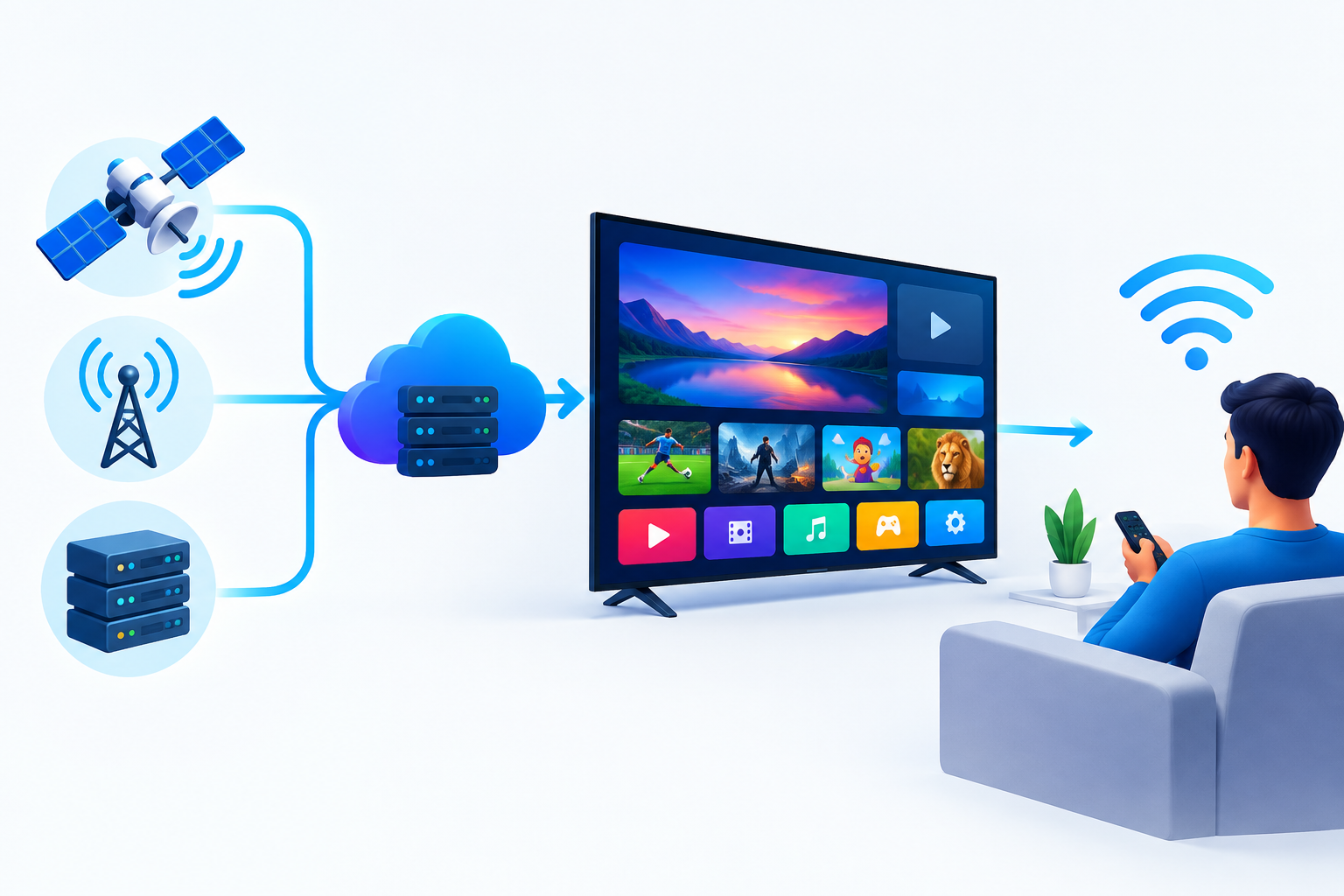
The process usually involves four parts:
- Content source: Live channels, on-demand programmes, films, or other video content are prepared for online delivery.
- IPTV server: The provider stores, manages, and distributes the video streams.
- Internet connection: Data travels from the provider’s server to your home network.
- Compatible player: An app, smart TV, streaming stick, phone, tablet, or computer decodes the stream and displays it.
Unlike a regular website video, live IPTV often sends a continuous stream that your player receives while the programme is being broadcast. On-demand IPTV works more like a video library: you select a title, and the server sends that content when you request it.
The main types of IPTV services
Live television
Live IPTV broadcasts channels in real time over the internet. This may include news, entertainment, documentaries, or sports, depending on the provider and its content rights. There can be a short delay compared with traditional television because the video must be encoded, delivered, buffered, and displayed.
Video on demand
Video on demand lets you choose a programme or film from a catalogue rather than watching a fixed schedule. You can usually pause, resume, or start the title when convenient, although the available controls depend on the service.
Time-shifted television
Some IPTV platforms offer catch-up viewing, replay features, or recorded programmes. These options allow you to watch content after its original broadcast. Availability varies by provider, channel, programme, and subscription plan.
How does IPTV work from the provider to your screen?
1. Content is prepared for streaming
Before a programme can be delivered online, it is converted into a digital format suitable for streaming. The provider may create several quality versions so the player can select an appropriate stream for the current connection.
2. The stream is divided into data segments
Streaming video is normally delivered in small segments rather than as one large downloadable file. Your player requests these segments in sequence. This allows playback to begin before the entire programme has arrived.
3. Your app requests the selected channel or title
When you choose a channel or on-demand programme, the app contacts the service’s server using the login details or playlist information supplied by the provider. The server then returns the stream and any related guide information supported by the service.
4. The device buffers and decodes the video
Your device temporarily stores a small amount of incoming data in a buffer. The app decodes the video and audio, then sends them to the screen and speakers. If data arrives consistently, playback appears continuous. If the connection slows or becomes unstable, buffering or quality changes may occur.
5. The player adapts to network conditions
Many modern streaming systems can switch between different quality levels. A stable connection may allow sharper video, while congestion can cause the player to select a lower-quality stream to keep playback going. This is why picture quality may change even when you have not changed the channel.
For a broader look at compatible applications, compare these IPTV apps for Android TV before choosing a player.
What do you need to use IPTV in Canada?
You do not necessarily need specialised television hardware. The essential requirements are a legitimate IPTV service, a suitable app or player, a compatible device, and a reliable internet connection.
- Internet service: Your connection should be stable enough for the video quality you want to watch.
- Compatible device: Options may include a smart TV, Android TV device, streaming stick, computer, smartphone, tablet, or set-top box.
- IPTV application: The app receives the provider’s stream and provides playback controls, channel navigation, or an electronic programme guide.
- Service credentials: Depending on the provider, you may receive a username and password, an M3U playlist, an Xtream Codes login, or another supported access method.
- Home network: Wi-Fi can work well, but placement, interference, and network traffic can affect performance.
For Canadian households comparing televisions and devices, Roku’s Canadian streaming platform is one example of a device ecosystem that supports internet-based entertainment apps. Always confirm that a specific IPTV application is available for your device before subscribing.
How does IPTV work on common devices?
Smart TV
On a compatible smart TV, you install an IPTV player from the television’s app store, open it, and enter the access details provided by your service. The exact installation steps differ between operating systems and TV brands. Some services may also use a separate streaming device if the television does not support the required app.
Android TV or Google TV
Android TV and Google TV devices generally provide access to a wide selection of media players. After installing a compatible app, you add your playlist or account details and organise the available channels. A wired connection or a strong Wi-Fi signal can help when streaming high-quality video.
Fire TV or another streaming stick
A streaming stick connects to an HDMI port and uses the television as its display. This can be useful when the built-in smart TV software does not support your preferred IPTV player. Check the app’s availability, device compatibility, and installation requirements before purchasing hardware.
Computer, phone, or tablet
On a computer, you may use a browser-based player or a desktop application. On mobile devices, an approved IPTV app can provide portable viewing, although mobile data usage may be significant when watching video away from Wi-Fi.
If you are setting up a new device, the Digi4Smart IPTV setup guide can help you organise the basic installation steps.
How does IPTV work with channel guides and playlists?
An IPTV subscription may provide more than a video stream. It can also include channel names, logos, programme schedules, categories, and an electronic programme guide. This information is usually supplied through a playlist or guide URL connected to your account.
The player reads that information and turns it into a navigable channel list. If a channel appears without a logo, has an incorrect name, or shows no schedule, the issue may relate to the provider’s guide data rather than your television.
Playlists can also contain multiple versions of a channel, such as different resolutions or regional feeds. Organising favourites and removing unused entries can make navigation faster, especially when a service offers a large catalogue.
How does IPTV work when the connection is slow?
Streaming quality depends on more than the advertised speed of your internet plan. Network congestion, Wi-Fi distance, router performance, server load, and the quality of the stream can all affect playback.
Try these practical steps when you experience buffering:
- Restart the IPTV app and the streaming device.
- Test another channel to determine whether the problem affects one stream or the entire service.
- Move the device closer to the router or use an Ethernet connection where possible.
- Pause downloads, cloud backups, and other activities that compete for bandwidth.
- Update the device software and IPTV player.
- Check whether the provider has a service outage or maintenance notice.
- Reduce the playback quality if the app offers a manual quality setting.
A VPN is not a guaranteed solution for buffering. It can sometimes change the network route, but it can also reduce performance if the chosen server is distant or congested. Read this guide about VPN use for IPTV in Canada and the United States before deciding whether one fits your situation.
Is IPTV legal in Canada?
IPTV is a delivery technology, so its legality depends on the content and the provider’s rights to distribute it. Services that legitimately licence and distribute their programming are different from services that provide unauthorised access to protected broadcasts.
Before subscribing, look for clear company information, transparent terms, reasonable support options, and an explanation of how the service obtains or distributes its content. Avoid providers that promise every premium channel at an implausibly low cost, request unusual payment methods, or provide no meaningful information about the business.
Consumers should also protect their account details and use reputable payment practices. A free trial can help assess reliability, but it does not by itself prove that a service has the necessary rights. Compare the available options in this guide to the best Canada IPTV services before making a decision.
Advantages and limitations of IPTV
Advantages
- It works across many internet-connected devices.
- It can combine live channels, catch-up features, and on-demand content.
- It avoids the need for a traditional satellite dish in many setups.
- It can offer flexible viewing at home or, where permitted, on supported mobile devices.
- Features such as favourites, search, pause, and programme guides can simplify navigation.
Limitations
- Playback depends on internet and home-network reliability.
- Some services have limited device support or complicated setup requirements.
- Video quality can vary with congestion and server performance.
- Channel availability may change when licensing or provider arrangements change.
- Not every IPTV service has the right to distribute the content it offers.
Frequently asked questions
How does IPTV work without a cable box?
IPTV uses an internet-connected app or device instead of a conventional cable receiver. The app requests the selected stream from an online server, then your device decodes and displays it.
Does IPTV require a smart TV?
No. You can use a compatible streaming stick, Android TV box, computer, phone, or tablet. The important requirement is that the device supports a suitable IPTV player and has internet access.
Can I watch IPTV over Wi-Fi?
Yes. Wi-Fi is commonly used for IPTV, but the signal must be stable enough for the selected video quality. Ethernet is often preferable when the router and television are close enough for a wired connection.
Why does IPTV sometimes buffer?
Buffering can result from Wi-Fi interference, network congestion, a busy server, device limitations, or an unstable stream. Testing another channel and using a wired connection can help identify the cause.
Conclusion
How does IPTV work in practical terms? A provider prepares television content as digital streams, sends the data through the internet, and your app or device buffers, decodes, and displays it. The viewing experience depends on the service, device, home network, and content rights. By checking compatibility, choosing a reliable connection, and evaluating a provider carefully, Canadian viewers can make more informed IPTV decisions.